
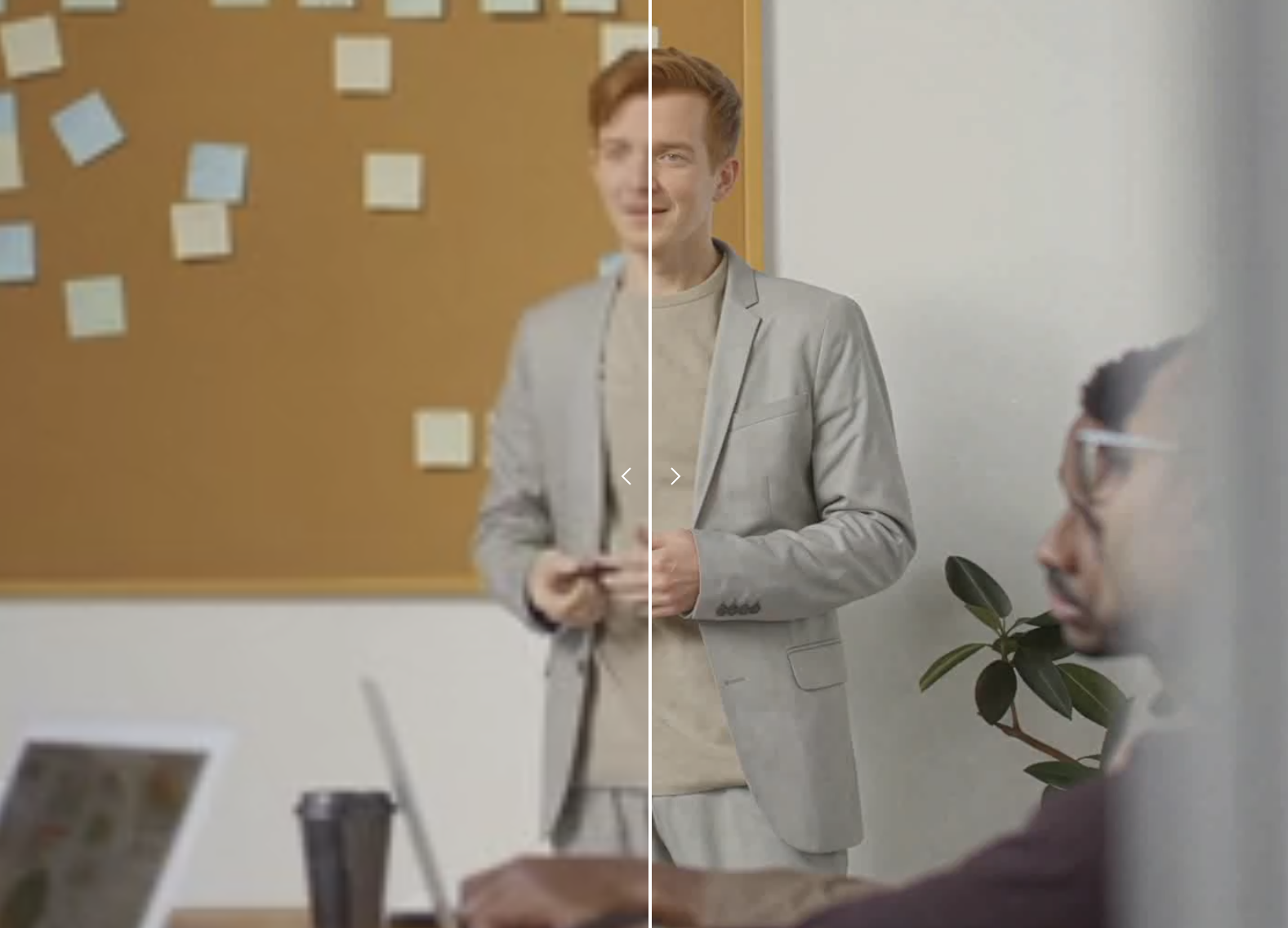
We all have them—old videos from flip phones, clips saved from social media years ago, or downloads that came out looking worse than expected. The memories are there, but the quality makes them painful to watch on today’s sharp screens.
Until recently, there was no good fix. Traditional video editing software could adjust brightness or contrast, but it could not add detail that was never there. That has changed with AI-powered video enhancement technology.
The Problem with Old and Downloaded Videos
Video quality degrades for many reasons:
- Older devices: Early smartphones and digital cameras recorded at 240p, 360p, or 480p
- Social media compression: Platforms like TikTok, Instagram, and Facebook heavily compress uploads
- Re-sharing: Each time a video gets downloaded and re-uploaded, quality drops
- Storage compression: Old files were often compressed to save space on small hard drives
The result is blocky pixels, blurry faces, and details you can barely make out. Playing these videos on a modern TV or monitor only makes it worse—the display just magnifies the problems.
How AI Upscaling Fixes This
Traditional upscaling stretches existing pixels to fill more space. This just makes blur bigger.
AI upscaling works differently. Neural networks trained on millions of video frames learn to recognize what details should look like—edges, textures, faces, text. When processing your video, the AI analyzes each frame and generates new pixels that add real detail, not just stretched fuzz.
A 480p video will not magically become true 4K footage. But it can become a much sharper 1080p that looks genuinely better, with cleaner edges, reduced noise, and improved clarity.
Videos Worth Enhancing
Family and Personal Archives
Those clips from the early 2000s—birthdays, holidays, vacations. Shot on devices that recorded at fractions of today’s resolution. AI upscaling makes them watchable again.
Downloaded Social Media Clips
Saved a video from Twitter, TikTok, or Reddit? Platform compression often leaves downloads looking muddy. Upscaling can restore some of that lost clarity.
Old Tutorial and Educational Content
Valuable how-to videos where you need to see details—wiring diagrams, code on screen, small mechanisms. Enhancing resolution makes the content actually usable.
Rare or Archival Footage
Old news clips, historical recordings, or hard-to-find content that only exists in low resolution. AI can help preserve and improve these for future viewing.
Note: AI upscaling cannot fix every problem. Extremely dark, motion-blurred, or heavily corrupted footage will see limited improvement. The technology works best on videos that are simply low resolution but otherwise clear.
What Resolution Should You Target?
Most AI upscalers offer several output options:
- 720p: A reasonable upgrade for very old footage. Good for sharing online.
- 1080p: The sweet spot for most content. Looks good on phones, laptops, and most TVs.
- 2K: For when you want maximum quality or plan to display on large screens.
Going from 360p directly to 2K is ambitious. For very low resolution sources, 720p or 1080p often produces the most natural results.
How to Upscale Your Videos
The process is straightforward with browser-based tools:
- Have your video file ready (MP4, MOV, or WebM work with most tools)
- Open an AI video upscaler
- Upload your file
- Choose your target resolution
- Wait for AI processing to complete
- Download the enhanced version
No software installation required. The AI processing happens in the cloud, so your computer’s specs do not matter.
Processing time depends on video length and target resolution. Short clips typically finish in a few minutes. Longer videos take proportionally more time.
Tips for Best Results
Use the highest quality source you can find. If you have the same video in multiple versions, start with the best one.
Trim before upscaling. Cut out unnecessary parts first. This speeds up processing and saves storage.
Be realistic about outcomes. AI enhancement is impressive but not magic. Expect improvement, not miracles.
Compare before and after. View results on the device where you will actually watch the video to judge the improvement.
Giving Old Videos New Life
That grainy vacation footage, the compressed meme you saved years ago, the tutorial from 2010 that still has useful information—none of these are stuck at their original quality anymore.
AI upscaling will not turn a blurry phone video into cinema-quality footage. But it can take unwatchable content and make it genuinely enjoyable again. For videos that matter to you, that improvement makes a real difference.